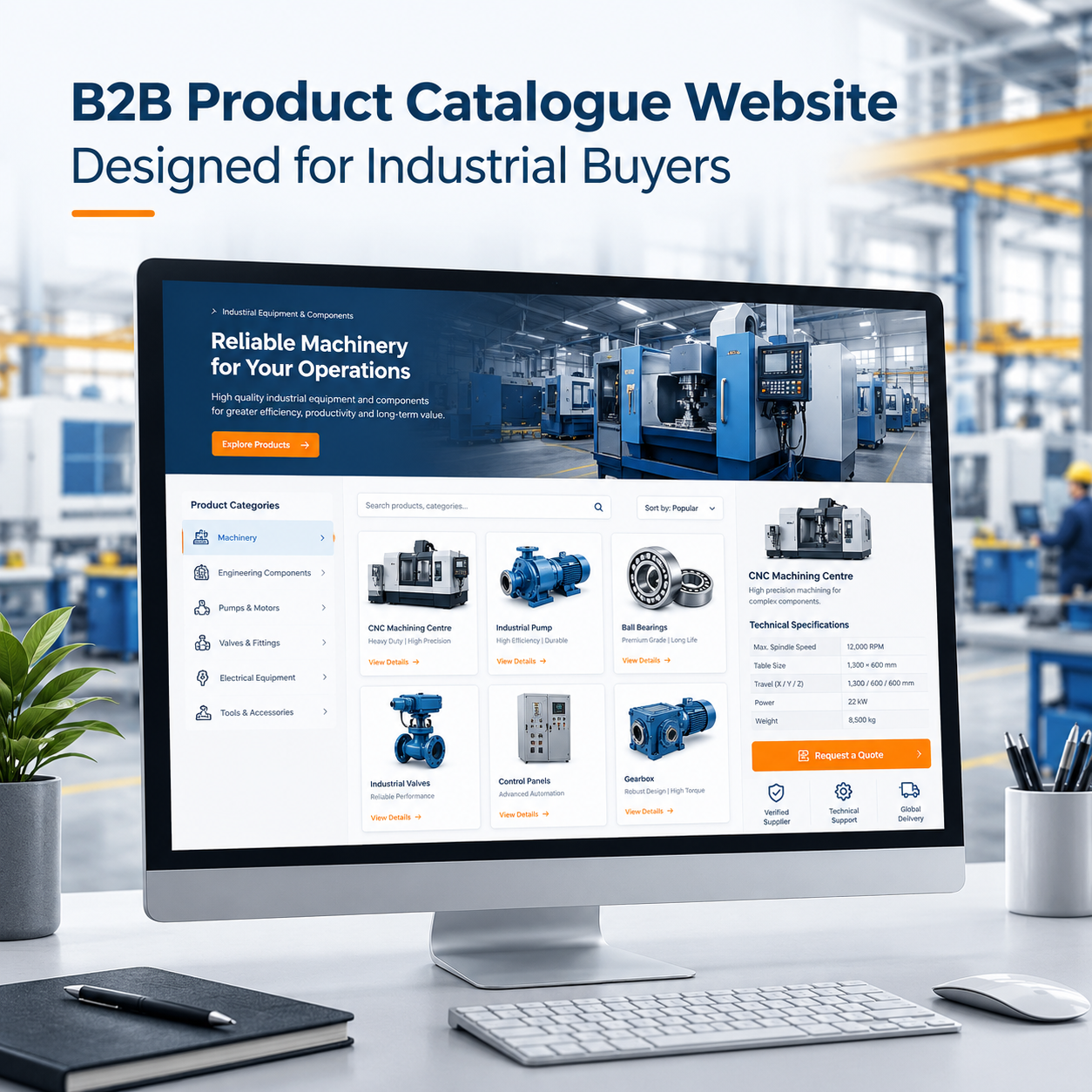
Industrial and B2B buyers need more than attractive product images when evaluating a supplier online. They want accurate specifications, clear product categories, technical documentation, reliable company information, and an easy way to request a quotation. A well-designed product catalogue website brings these elements together, helping businesses present their offerings professionally and making it easier for potential customers to identify the right products. Businesses looking to build a professional online presence can explore the website solutions offered by Dotoit. For manufacturers, wholesalers, distributors, and industrial suppliers, a digital catalogue can become an important part of the sales process. Instead of depending entirely on printed catalogues, emails, or repeated phone enquiries, businesses can provide customers with an organised online resource that remains accessible whenever they need it.
However, designing a successful B2B catalogue requires more than uploading product photographs and descriptions. The website must be structured around how business buyers search, compare, evaluate, and purchase products.
What Is a Product Catalogue Website?
A product catalogue website is a business website that displays products in an organised and searchable format. It allows visitors to explore categories, review product specifications, compare available options, and contact the supplier. Unlike a traditional eCommerce store, a catalogue website does not necessarily require a shopping cart or online payment system.
For industrial and B2B businesses, a catalogue website can include:
- Product categories and subcategories
- Detailed product descriptions and technical specifications
- Product photographs, diagrams, and datasheets
- Search and filtering functionality
- Information about manufacturing capabilities and customisation
- Request-for-quotation forms
- Company information, certifications, and contact details
For example, an industrial equipment manufacturer may display different machinery models along with their dimensions, operating capacities, power requirements, and applications. A procurement manager can review the available information before contacting the supplier to discuss pricing, availability, and delivery.
The primary objective is to help potential buyers find relevant products and take the next step with confidence.
1. Understand How Industrial and B2B Buyers Search
The first step in designing a product catalogue website is understanding what customers need to know before making an enquiry.
Industrial buyers may search by product name, model number, part number, material, size, capacity, technical specification, or intended application. Procurement teams may also need information about minimum order quantities, customisation options, delivery capabilities, and compliance requirements.
A website should support these different search behaviours rather than forcing every visitor to browse the same general product list.
Organise products around buyer requirements
Identify the main product groups and the attributes buyers use to distinguish between products. Depending on the industry, these may include:
- Product type and application
- Material and dimensions
- Capacity, power, or performance
- Model number or product code
- Industry-specific standards and certifications
- Available variants and customisation options
For example, a supplier of industrial pumps could organise products by pump type, application, and operating requirements. This structure allows engineers and purchasing teams to narrow down their options without reviewing every product individually.
Before designing the interface, review common customer questions and consult the sales team. This can help identify which information deserves the most prominent position on the website.
2. Build a Clear and Scalable Catalogue Structure
A well-organised catalogue makes product discovery faster and creates a foundation for long-term website growth.
The main navigation should help visitors understand the available product range immediately. Use meaningful category names, logical subcategories, and consistent product naming instead of complicated internal terminology.
A practical website structure might include:
- Home page: Introduces the business, its products, and its core capabilities.
- Product categories: Group related products into clearly defined sections.
- Individual product pages: Provide specifications, applications, images, and enquiry options.
- Industries served: Explain which sectors use the products.
- Technical resources: Offer datasheets, manuals, drawings, and other relevant documents.
- About the company: Present manufacturing capabilities, quality processes, and company credentials.
- Contact and quotation: Make it easy to discuss requirements with the sales team.
Individual product pages are particularly important. When significant products or product families have descriptive URLs, buyers can share specific product information with colleagues, and search engines can better understand the website’s content.
For larger catalogues, reusable page templates help maintain consistency while allowing the website to expand without redesigning every page.
3. Design Product Pages That Answer Technical Questions
An industrial product page should help buyers determine whether a product meets their requirements. Clear and accurate information is more valuable than lengthy promotional descriptions.
Each product page should include the following elements where relevant.
Product name and overview
Use a descriptive product title and a short explanation of its purpose. Include the model number or product code when applicable.
Technical specifications
Present important specifications in a structured table. Depending on the product, these may include dimensions, materials, operating conditions, capacity, power requirements, tolerances, or compatibility.
| Product detail | What to provide |
| Product identification | Product name, model, and part number |
| Technical data | Relevant dimensions, materials, capacity, and performance |
| Applications | Suitable uses and industries |
| Available options | Variants and approved customisation options |
| Documentation | Datasheets, manuals, drawings, or certificates |
| Enquiry details | A clear way to request pricing or technical assistance |
Only publish verified specifications. If a detail varies by model or configuration, explain the variation instead of presenting a general value as universally applicable.
Product images and technical documents
Use clear photographs that show the actual product wherever possible. Multiple viewing angles, close-up images, labelled diagrams, and technical drawings can help buyers understand complex products.
Where available, provide downloadable PDF datasheets, installation guides, product manuals, and CAD files. Keep these documents clearly labelled and accessible on mobile devices.
A product page that answers technical questions before the first conversation can make the enquiry process more productive for both the buyer and the supplier.
4. Add Search and Filters for Faster Product Discovery
When a catalogue contains dozens or hundreds of products, manually browsing every category becomes inefficient. Search and filtering features help buyers narrow down their options.
A useful catalogue search should support product names, model numbers, part numbers, and relevant product codes. Where possible, it should handle common formatting differences and partial matches.
Filters should reflect the attributes that genuinely matter to buyers. An electrical equipment supplier, for example, might provide filters for voltage, power rating, product type, and application. A materials supplier might use grade, thickness, dimensions, and material type.
Keep filters understandable and avoid offering options that do not help users make a decision.
For larger catalogues, test how filtering behaves when products have multiple variants. Search results should remain relevant, and users should be able to remove filters or return to the complete category easily.
The goal is not to add the greatest number of features. It is to help customers identify suitable products with fewer unnecessary steps.
5. Make Request-for-Quotation Forms Easy to Use
Many industrial and B2B transactions require customised pricing, bulk quantities, technical discussions, or negotiated terms. For these businesses, a request-for-quotation (RFQ) form can be more appropriate than a standard online checkout.
The form should collect enough information for the sales team to understand the requirement without creating unnecessary barriers.
Useful fields may include:
- Customer name and business email
- Company name
- Product name, model, or part number
- Required quantity
- Technical requirements or customisation details
- Destination or delivery location, when relevant
- Expected delivery timeline, if important
Place a clear Request a Quote or Enquire About This Product button on individual product pages. Ideally, selecting the button should carry the product name or model into the enquiry form automatically.
This reduces the need for customers to re-enter information and helps the sales team understand which product generated the enquiry.
For complex catalogues, consider allowing buyers to add multiple products to a single quotation request. This can be useful for distributors, procurement departments, and businesses sourcing several components together.
6. Build Trust Through Evidence and Company Information
Industrial purchasing decisions often involve technical suitability, commercial risk, and supplier reliability. A professional catalogue website should make it easy for buyers to evaluate the business behind the products.
Include genuine information about the company’s manufacturing or supply capabilities, quality-control processes, experience, service coverage, and relevant certifications.
Where appropriate, showcase:
- Real product and facility photographs
- Verified certifications and compliance documentation
- Manufacturing processes and available capabilities
- Industry applications and project examples
- Warranty, after-sales support, or maintenance information
- Clear contact details and business location
Avoid unsupported claims such as guaranteed performance, unverified production capacity, or certifications the business does not hold.
Trust is built through specific, accurate information. Buyers should be able to understand what the company supplies, what it can customise, and how to contact the right team without searching through unrelated pages.
7. Optimise the Catalogue for Search Engines
Search engine optimisation helps potential buyers discover relevant products when searching online. A catalogue website should therefore be planned for search visibility from the beginning rather than treated as a design project alone.
Create descriptive product and category pages
Use page titles, headings, URLs, and descriptions that accurately identify the product or category. For example, a page about stainless steel industrial valves should explain the relevant valve types, applications, specifications, and available options.
Avoid placing every product on a single page. Important product categories and distinct product families may deserve dedicated pages when they serve different search needs.
Write useful product descriptions
Do not rely entirely on manufacturer-provided descriptions or short lists of technical specifications. Explain what the product does, where it is used, which requirements it addresses, and what buyers should consider when selecting it.
The content must remain technically accurate and avoid repeating the same generic paragraph across hundreds of pages.
Make technical information accessible
Where practical, present essential specifications as readable HTML text rather than only as text embedded in images. Search engines and visitors can then access the information more easily.
PDF documents can supplement product pages, but they should not be the only place where essential product information appears.
Control catalogue indexing
Large catalogues can generate many filter combinations, duplicate URLs, and pages with little unique information. Review the site’s URL structure, canonical settings, internal links, and indexing rules to help search engines focus on useful pages.
Relevant structured data may also help search engines interpret eligible product information. Markup must accurately represent the page and should not contain invented prices, availability, or product details.
8. Prioritise Mobile Usability and Website Performance
Industrial buyers do not always research products from desktop computers. They may review a product link on a phone, check specifications while travelling, or forward technical information to colleagues.
A mobile-friendly catalogue should have readable text, clear navigation, responsive product tables, accessible buttons, and forms that are easy to complete on smaller screens.
Website performance matters as well. Compress images appropriately, avoid unnecessary animations, reduce excessive scripts, and use suitable caching and hosting configurations.
Test important tasks on actual mobile and desktop layouts, including:
- Finding a product by name or code
- Applying and removing filters
- Opening a technical datasheet
- Comparing relevant product details
- Submitting a quotation request
A website is successful when visitors can complete these tasks reliably, not simply when the homepage looks attractive.
9. Plan for Catalogue Maintenance and Future Growth
A product catalogue website needs ongoing maintenance to remain useful. Products change, specifications are revised, documents become outdated, and new models are introduced.
Before launch, decide who is responsible for updating product information and how changes will be reviewed.
A centralised product data structure can help maintain consistency across product listings, detail pages, filters, and downloadable documents. For larger businesses, integration with inventory software, an ERP system, or a product information management platform may be worth considering, depending on existing workflows and technical requirements.
Plan for future expansion by establishing consistent product fields, reusable page templates, and a logical category hierarchy. New products should fit naturally into the catalogue without creating confusing navigation.
For businesses with different customer groups, additional features such as customer-specific pricing, account access, repeat-order tools, or distributor portals can be introduced when there is a clear business need. These are not essential for every catalogue website and should be selected according to the company’s sales process.
10. Measure Whether the Website Supports Business Goals
A product catalogue should be evaluated by how effectively it supports product discovery and business enquiries, not only by its total visitor count.
Track useful indicators such as:
- Organic visits to product and category pages
- Internal search usage and unsuccessful searches
- Downloads of relevant technical documents
- Clicks on quotation and product-enquiry buttons
- Completed RFQ forms
- Enquiry quality and sales-team follow-up
- Products and categories generating qualified leads
Analytics tools and form tracking can help identify where visitors encounter difficulties. For example, frequent searches with no matching results may indicate missing products, inconsistent naming, or inadequate search functionality.
Use these insights to improve the catalogue over time. The most valuable improvements are those that make product information clearer, reduce friction, and help potential customers move towards a relevant business conversation.
Common Mistakes to Avoid When Designing a B2B Product Catalogue Website
Even a visually polished website can perform poorly when its catalogue is difficult to use. Avoid these common mistakes:
- Listing every product on one page: Large lists make it harder to identify relevant products.
- Using incomplete specifications: Missing technical information can prevent buyers from evaluating suitability.
- Depending only on PDF catalogues: PDFs are useful resources, but essential information should also be accessible through well-structured web pages.
- Using generic product descriptions: Repeated content does little to explain differences between models or applications.
- Hiding enquiry options: Buyers should not have to navigate several pages to request a quotation.
- Ignoring mobile usability: Small text, difficult tables, and lengthy forms can create unnecessary friction.
- Leaving outdated documents online: Incorrect specifications or obsolete datasheets can damage buyer confidence.
- Adding unnecessary functionality: Features should solve real customer problems rather than make the website more complicated.
A successful catalogue combines clear design, accurate product data, useful search features, and a straightforward route to contacting the supplier.
How Dotoit Can Help Businesses Build a Professional Catalogue Website
A product catalogue website needs to reflect the business’s products, customer requirements, and sales process. The right approach begins with understanding the catalogue structure, identifying the information buyers need, and planning how the website will support future growth.
Dotoit provides web development services for businesses that need functional, well-structured websites. A catalogue project can be planned around product categories, detailed product pages, responsive layouts, enquiry forms, and the technical requirements of the business.
Through thoughtful UI/UX design, product information can be organised to make navigation clearer and help buyers find relevant details more efficiently. Search-friendly page structures and relevant SEO and SEM services can also support a broader strategy for improving online visibility.
The best solution depends on the size of the catalogue, the complexity of the products, the need for integrations, and the way the sales team handles enquiries. A clearly defined plan helps ensure that design and development decisions support practical business objectives.
Frequently Asked Questions
1. What should an industrial product catalogue website include?
An industrial product catalogue website should include organised product categories, individual product pages, accurate technical specifications, product images, downloadable documents, search and filtering tools, company information, and clear enquiry or quotation options.
2. Is a product catalogue website different from an eCommerce website?
Yes. A product catalogue website primarily helps visitors explore products and enquire about them. An eCommerce website usually includes purchasing features such as a shopping cart, checkout, and online payments. Some B2B websites combine both approaches.
3. How can a B2B product catalogue website generate more enquiries?
It can support enquiries by making products easy to find, presenting complete specifications, displaying relevant trust information, and placing clear quotation buttons on product pages. Forms that capture product details and required quantities can also help sales teams respond more effectively.
4. Should every product have its own page?
Not necessarily, but important products and distinct product families often benefit from dedicated pages. Individual pages are particularly useful when products have different specifications, applications, model numbers, or search demand. Closely related variants can sometimes be grouped on one well-organised page.
5. Can a product catalogue website help with SEO?
Yes. Descriptive category pages, useful product information, readable specifications, logical internal links, and crawlable URLs can help search engines understand a catalogue. Results depend on competition, technical implementation, content quality, and other ranking factors.
6. Should industrial businesses display product prices online?
It depends on the sales model. Standardised products may benefit from published prices, while customised or bulk orders may require quotation-based pricing. When prices are not public, businesses should still provide useful information about specifications, ordering requirements, and how to request a quote.
7. Can a product catalogue website support hundreds or thousands of products?
Yes, provided the website has a scalable data structure, consistent product attributes, logical categories, effective search, and appropriate filtering. Large catalogues also need careful planning for page performance, indexing, and ongoing product-data maintenance.
Conclusion
Designing a product catalogue website for industrial and B2B buyers requires a balance of usability, technical accuracy, search visibility, and business functionality. Buyers need to identify suitable products, understand their specifications, assess supplier credibility, and request quotations without unnecessary effort.
By organising products around customer requirements, creating detailed product pages, implementing useful search and filters, and maintaining accurate information, businesses can turn a basic online catalogue into a more effective resource for product discovery and sales enquiries.
For manufacturers, wholesalers, distributors, and industrial suppliers, a well-planned website is not simply a digital product list. It is a practical way to present capabilities, support purchasing decisions, and make it easier for the right customers to start a business conversation. With a clear strategy and the right development approach, Dotoit can be a starting point for businesses planning their next website project.